Overview
RestorePhotos is an AI-powered photo restoration service that repairs blur, scratches, and damage, and colorizes black & white photos, starting at $6.99. It solves a deeply personal problem: the shoebox of faded family portraits, the scratched wedding photo, the grainy baby picture that deserves a second chance. The service uses advanced machine learning models, including Google Gemini AI, to analyze and reconstruct missing details, remove scratches and noise, sharpen out-of-focus images, and colorize monochrome photographs. With over 470,000 users and 2 million photos restored, it positions itself as an affordable alternative to professional photo restoration studios, which typically charge $50 or more per image.
The target audience is broad but specific: individuals digitizing family archives, genealogists piecing together ancestral records, small business owners selling vintage or restored imagery, and anyone who has inherited a collection of damaged photographs. The competitive landscape includes both professional restoration services and other AI tools like Remini, MyHeritage Photo Enhancer, and Topaz Photo AI. RestorePhotos is a solid alternative to Remini, MyHeritage Photo Enhancer, and Topaz Photo AI. What sets it apart is its transparent one-time pricing, its focus on face restoration, and its commitment to privacy, with photos stored securely on Cloudflare R2 and automatically deleted after 30 days. The thesis of this review is straightforward: RestorePhotos delivers professional-grade restoration results at a consumer-friendly price point, making it the most accessible option for everyday users who want to preserve their memories without learning complex editing software or paying studio rates.
Key Features
- AI Face Restoration: The core feature is the AI's ability to restore faces in old photos. It analyzes facial features, edges, and textures to rebuild damaged areas, remove scratches, noise, and blur, while preserving the original character and expression. This is particularly effective for portraits, family photos, and vintage images where the face is the focal point. The AI is trained on millions of photographs, allowing it to reconstruct missing details with impressive accuracy. In practice, users simply upload a photo and select the Restore style, and the system handles the heavy lifting automatically.
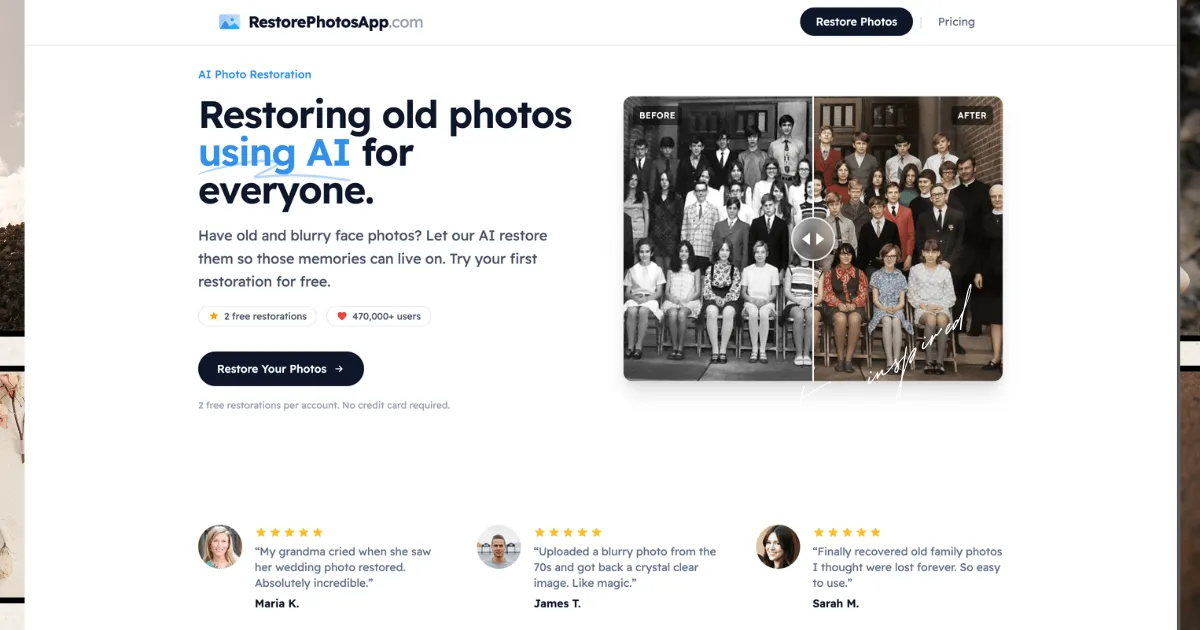
- Colorization: The Colorize style turns black & white and sepia photos into realistic color images. The AI predicts natural skin tones, fabric colors, and background hues based on context. It works on photos from the 1800s to recent black & white shots. While the colors are an interpretation rather than a historical record, the results are often stunning and bring old memories to life in a new way. The interface shows a before-and-after slider, so users can immediately see the transformation and decide if the colorization matches their expectations.
- Sharpen Blurry Photos: The Sharpen style is designed for blurry, soft, or out-of-focus photographs. It reconstructs sharp facial features, edges, and details, making it useful for old phone photos, screenshots, and motion-blurred images. The AI works by rebuilding detail that the camera failed to capture, so lightly soft portraits come back dramatically better, while extremely blurry or tiny faces may have limited improvement. This feature is particularly valuable for users digitizing old prints that were never perfectly focused in the first place.
- Scratch and Damage Removal: The service can remove scratches, creases, water damage, and other physical imperfections from scanned prints. The AI fills in the damaged areas with plausible detail, effectively cleaning up the image. This is a key feature for restoring old family photos that have been stored in attics or albums for decades. Users can combine this with the Restore style for a comprehensive cleanup, or use the Cleanup style specifically for damage removal without altering the rest of the image.
- Bulk Restoration: For users with large collections, the bulk restoration feature allows processing many photos in one session. This is ideal for digitizing entire albums or shoeboxes of prints. The service handles the queue automatically, and users can download the restored images individually or in batches. This feature is a significant time-saver for genealogists or family historians who might have hundreds of photos to process, and it makes the per-credit cost even more attractive when working through a large archive.
- High-Resolution Output: Restored photos are delivered at 1080p resolution, which is suitable for reprinting framed portraits, sharing on social media, or archiving. The Pro and Family plans include high-resolution output, and all plans allow full-resolution downloads. The quality of the final file depends on the quality of the upload, so users are encouraged to scan or photograph originals in good lighting. This ensures that the restored images are actually usable for printing and display, not just for digital viewing.
- Privacy and Security: Photos are processed over HTTPS and stored privately on Cloudflare R2. Originals and restored versions are kept for 30 days, then permanently deleted. The service never shares photos with third parties or uses them to train AI models. This is a significant advantage for users concerned about the privacy of their personal memories, especially when compared to free tools that may use uploaded images for model training or other purposes.
How It Works
Using RestorePhotos is refreshingly straightforward. First, users create an account, which includes 2 free restorations with no credit card required. This allows them to test the service on their own photos before committing to a paid plan. The signup process is quick, requiring only basic information, and the free credits are immediately available. After signing up, users navigate to the restore page, where they can upload an image from their device. The upload process is simple and works in the browser on any device, whether desktop, tablet, or mobile.
Once the photo is uploaded, users choose a restoration style: Restore, Colorize, Enhance, Cleanup, or Sharpen. Each style is tailored to a specific need, and users can experiment with different styles on the same photo using their credits. The AI processing takes under 30 seconds, and the result is displayed with a before-and-after slider so users can see the improvement. If satisfied, they can download the restored image in full resolution. If not, they can try a different style or adjust the original photo. This iterative workflow is intuitive and encourages experimentation without wasting credits.
For bulk restoration, users can upload multiple photos at once and process them in a single session. The service handles the queue, and users can download each restored image as it's ready. There's no need to install any software, and the entire workflow is designed to be intuitive even for non-technical users. The learning curve is minimal, and the free credits provide a risk-free way to get started. The service does not currently offer integrations with cloud storage platforms like Google Photos or Dropbox, so users need to upload files directly from their devices, but this is a minor inconvenience given the simplicity of the process.
Use Cases
- A family historian digitizing a grandparent's wedding album: This user has a collection of faded, scratched, and torn photos from the 1940s. They use RestorePhotos to repair the damage and then apply the Colorize style to bring the black & white portraits to life. The bulk restoration feature allows them to process dozens of photos in one sitting, saving hours of manual editing. The result is a vibrant, shareable digital album that younger generations can connect with emotionally.
- A genealogist building a family tree with missing faces: Researchers often encounter old photos with severe damage or missing facial features. RestorePhotos can reconstruct facial features, making it easier to identify ancestors and confirm family connections. The high-resolution output is useful for printing and sharing with relatives, and the privacy policy ensures that sensitive historical images are handled securely.
- A vintage shop owner who sells restored photos: A small business owner who curates vintage photographs for sale uses RestorePhotos to enhance old images for clients. The one-time credit packs are cost-effective for occasional use, and the commercial rights allow them to use the restored photos in their business. They can offer restoration as a value-added service to customers, increasing their revenue per sale.
- An individual with a single precious photo of a deceased relative: Someone who has one treasured photo of a loved one can use the free credits to restore it. The emotional value of seeing a clear, colorized version of a parent or grandparent is immense, and the service makes this accessible to everyone, regardless of budget. The 30-day retention period is sufficient for downloading the restored image and sharing it with family.
- An archivist at a local historical society: Organizations with historical photo collections can use the bulk restoration feature to digitize and restore large archives. The privacy policy ensures that sensitive historical images are handled securely, and the per-credit cost makes it feasible to process hundreds of photos on a limited budget. The restored images can be used for exhibitions, publications, and online archives.
Design & User Experience
The RestorePhotos website presents a clean, modern, and professional design that immediately communicates its purpose. The landing page features a prominent before-and-after slider that demonstrates the service's capabilities right away, which is both visually compelling and informative. The navigation is intuitive, with clear links to the restore page, pricing, FAQ, and comparison pages. The overall aesthetic is warm and inviting, using soft colors and human imagery that aligns with the emotional nature of photo restoration.
The user interface for the restoration workflow is minimal and focused. The upload process is a simple drag-and-drop or file selection, and the style selection is presented as clear, labeled options. The before-and-after slider on the results page is a standout design decision, as it allows users to immediately appreciate the transformation. The learning curve is essentially zero, which is a significant advantage for a tool aimed at non-technical users, including older individuals who may be digitizing family archives.
One minor criticism is that the website could benefit from more detailed documentation or tutorials for users who want to understand the technical aspects of the restoration process. However, for the vast majority of users, the simplicity is a feature, not a bug. The mobile experience appears to be responsive and functional, allowing users to upload and restore photos directly from their phones, which is a practical consideration for those who photograph old prints rather than scanning them.
Pricing & Value
RestorePhotos offers four one-time credit packs, with no subscription required. The Starter pack costs $6.99 for 10 credits, which works out to about $0.70 per credit. The Pro pack costs $16.99 for 25 credits, bringing the per-credit cost down to $0.68. The Family pack costs $29.99 for 50 credits at $0.60 per credit, and the Studio pack costs $54.99 for 100 credits at $0.55 per credit. Each credit covers one restoration, whether it's repair, colorization, or sharpening. Credits never expire, so users can buy them once and use them whenever they're ready.
Compared to professional photo restoration services, which can cost $50 or more per image, RestorePhotos is significantly cheaper. Even the Starter pack offers a fraction of the cost of a single professional restoration. The free 2 credits on signup provide a risk-free trial, and the 30-day money-back guarantee on all purchases adds further confidence. The pricing is transparent, with no hidden fees, and the per-credit cost decreases with larger packs, making the Family and Studio plans the best value for users with many photos. For occasional users, the Starter pack is a low-commitment entry point, while the Studio pack is ideal for archivists or small businesses processing large volumes.
Who Is RestorePhotos Best For?
RestorePhotos is best for three primary user segments. First, family historians and individuals digitizing personal photo collections. These users have emotional attachments to their photos and want a simple, affordable way to restore them without learning complex software. The free credits and low entry price make it a no-brainer for this group. Second, genealogists and researchers who need to process large volumes of historical photos. The bulk restoration feature and per-credit pricing make it feasible to work through entire archives, and the privacy policy ensures sensitive images are handled securely. Third, small business owners who sell vintage or restored photos. The commercial rights and cost-effective credit packs make it a viable tool for adding value to their products.
Users who might want to look elsewhere include professional photographers or digital artists who need pixel-level control over the restoration process. For them, a tool like Adobe Photoshop or Topaz Photo AI offers more granular editing capabilities, albeit with a steeper learning curve and higher cost. Additionally, users with extremely damaged photos, such as those that are torn into multiple pieces or have severe water damage, may find that the AI cannot fully reconstruct the image. In these cases, a professional restoration service with manual editing capabilities might be a better, albeit more expensive, option.