Overview
Content24 is an all-in-one AI creative and marketing platform that aims to solve a problem many teams know all too well: the chaos of juggling half a dozen disconnected tools to plan, create, and publish content. Instead of hopping between a text generator, an image maker, a video editor, and a social scheduler, Content24 pulls all of those capabilities into a single workspace. The platform covers the entire content lifecycle, from brainstorming ideas in an AI chat to publishing finished posts across social channels, and it does so with a strong emphasis on marketing workflows rather than just raw generation.
The target audience here is broad but specific. Solo creators who need to produce daily video content, marketing teams at mid-size companies that want to scale blog output, agencies managing multiple client accounts, and even startup founders wearing every hat at once can all find something useful. The platform is particularly appealing to teams that need brand consistency across formats, since everything lives in one place and shares data between tools. For businesses with compliance requirements, Content24 also holds ISO 9001 and ISO 27001 certifications and is GDPR compliant, which is a meaningful differentiator in a market where data handling is often murky.
The competitive landscape for AI content tools is crowded, with specialized platforms dominating different niches. Jasper and Copy.ai focus heavily on text generation, Canva owns the design space, and tools like Lumen5 or Synthesia handle video. Content24's bet is that users are tired of stitching these together. Content24 is a solid alternative to Jasper, Canva, and Lumen5, offering a more integrated approach that combines text, image, video, and publishing in one place. The thesis of this review is straightforward: Content24 is not the best at any single task, but its strength lies in consolidation, and for teams that value workflow efficiency over niche perfection, that trade-off can be a winning one.
Key Features
- AI Chat: The chat assistant is the entry point for most content creation sessions. Users can brainstorm topics, ask for outlines, refine drafts, or get suggestions for headlines and hooks. It works conversationally, so you can iterate on ideas naturally, and the responses can be inserted directly into other tools like the AI Writer or Social Suite. This feature matters because it removes the friction of starting from a blank page, which is often the biggest hurdle in content production.
- AI Writer: This tool handles long-form content generation, including blog posts, articles, and marketing copy. Users input a topic or a rough outline, select a tone and style, and the AI produces a draft that can be edited in a built-in rich text editor. The editor supports formatting, image insertion, and SEO suggestions, so you can polish the piece without leaving the platform. For content marketers who need to publish multiple posts per week, this feature alone can cut production time dramatically.
- AI Image Generation: Text-to-image generation is built directly into the platform, supporting multiple styles, aspect ratios, and resolutions. You can describe a visual concept, and the AI produces several variations to choose from. The images are optimized for web use, and there are basic editing tools for cropping or adding text overlays. This is particularly useful for creating social media graphics, blog featured images, and ad creatives without needing a separate design tool or a subscription to a stock photo service.
- AI Video Creation: Video is where Content24 starts to stand out from text-focused competitors. Users can generate videos from scripts or simple prompts, and the platform assembles stock footage, animations, and voiceovers automatically. There is also an AI avatar feature that creates presenter-style videos, which is popular for training content, product explainers, and social media posts. The built-in timeline editor allows for fine-tuning, and exports are available in multiple resolutions, making it a viable option for teams that need video but lack production resources.
- AI Workflows: This automation engine is the most powerful feature for productivity. Users can create multi-step workflows that chain together different AI tools. For example, a workflow might generate a blog post, create three accompanying images, draft social media captions, and schedule posts across platforms, all with a single trigger. Workflows can run manually or on a schedule, which is ideal for repetitive tasks like weekly newsletter creation or monthly content reporting. This feature transforms Content24 from a collection of tools into a genuine content operations system.
- AI Social Suite: The social media management module covers planning, scheduling, and publishing across major platforms like Instagram, X, and Facebook. It includes a visual content calendar, analytics dashboards, and auto-posting capabilities. The key advantage is the integration with the creation tools, so a user can generate an image and a caption, then schedule the post without ever switching tabs. For social media managers, this consolidation saves significant time and reduces the risk of errors from copy-pasting between apps.
- AI Website Maker: This feature allows users to build simple, responsive websites or landing pages using AI. You input a description of the site, and the platform generates a layout with placeholder content that can be customized. It supports custom domains and basic SEO settings, making it useful for campaign landing pages or quick portfolio sites. While it is not a replacement for a full website builder like Webflow, it is a handy addition for marketers who need a page up in minutes.
How It Works
Getting started with Content24 is a smooth process. Users sign up on the website with an email and password, and after verification, they land on a clean dashboard that presents each tool as a distinct module. The onboarding flow includes a short tutorial that highlights the AI Chat as a starting point and suggests exploring the templates library to see what the platform can produce. There is also a demo request option for teams that want a guided walkthrough before committing.
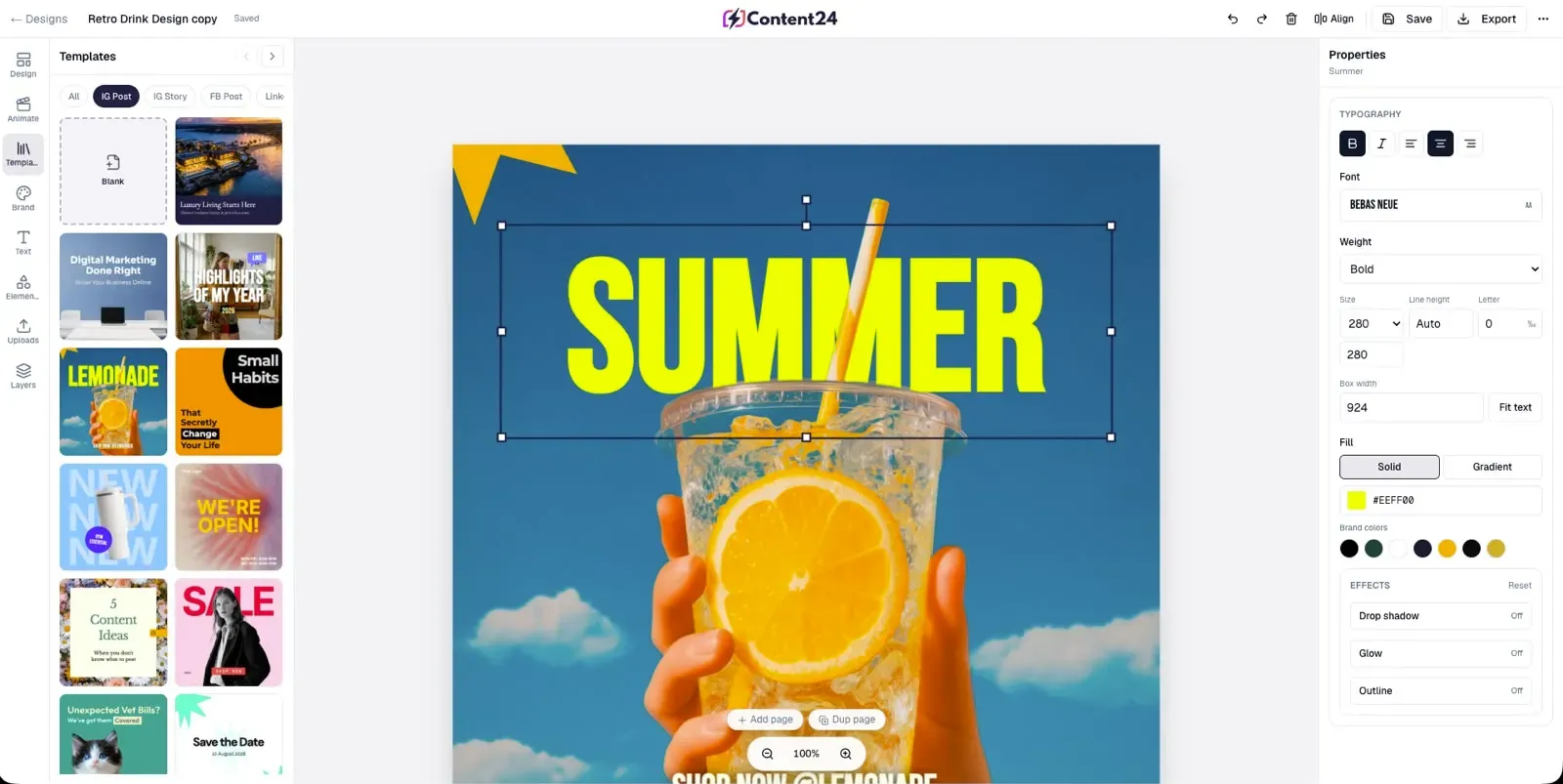
Once inside, the workspace is organized around a sidebar that lists all the tools: Chat, Writer, Image, Video, Workflows, Social, and Website. Users can create projects to group related content, which is useful for campaign-based work. For example, a user launching a new product might create a project called "Product Launch" and keep all blog drafts, images, videos, and social posts in that space. This project-based organization makes it easy to maintain context and brand consistency across formats.
The day-to-day workflow is designed to be fluid. A typical session might start with AI Chat to brainstorm five blog post ideas, then move to AI Writer to expand one idea into a full draft. From there, the user generates a featured image with AI Image, creates a short promo video with AI Video, and finally schedules everything through the Social Suite. Data flows between tools, so a caption written in the Writer can be pulled into the Social calendar, and images generated for a blog post can be reused in a social graphic. The platform also supports team collaboration, with shared workspaces and role-based permissions, which is essential for agencies or marketing departments.
Integrations are handled through native connections to social platforms and cloud storage services. The platform also offers an API for custom integrations, though that is likely aimed at enterprise users. For most teams, the built-in connections cover the essentials, and the ability to export content in standard formats means you can always move work to other tools if needed. The learning curve is moderate; the basic tools are intuitive, but mastering AI Workflows and getting the most out of the video editor takes some experimentation. The platform provides documentation and video tutorials to bridge that gap.
Use Cases
- A solo YouTube creator who needs to post daily videos can use AI Video and AI Avatar to produce content without a camera crew. They can script a video in AI Writer, generate b-roll with AI Image, and have an AI avatar present the content. The result is a consistent publishing schedule that would otherwise require hours of filming and editing, freeing the creator to focus on strategy and audience engagement.
- A marketing team at a B2B software company can leverage AI Writer to produce weekly blog posts and whitepapers, AI Image for infographics and slide decks, and the Social Suite to manage LinkedIn and Twitter presence. The team collaboration features allow multiple writers and editors to work on the same campaign, and the project-based organization keeps everything aligned. The outcome is a steady stream of thought leadership content that positions the company as an industry authority.
- A digital marketing agency managing 20 or more client accounts can use AI Workflows to automate repetitive tasks like generating monthly performance reports or creating social media calendars. The platform's ability to handle multiple brands in separate workspaces makes it scalable, and the time savings from automation can be redirected toward strategy and client communication. The agency can also white-label the output, presenting polished content to clients without revealing the AI assistance.
- An e-commerce business launching a new product line can use AI Image to create lifestyle product photos and AI Video to generate promotional clips for social ads. The AI Website Maker can quickly build a landing page for the launch, and the Social Suite can schedule a teaser campaign across platforms. This integrated approach means the entire launch campaign can be executed by one person in a matter of days, rather than weeks.
- A startup founder with no marketing team can use Content24 as their entire marketing department. They can build a company website, write blog posts, generate social media content, and design ad creatives, all without hiring specialists. This allows the founder to maintain an active online presence while focusing on product development and fundraising, which is critical in the early stages of a company.
Design & User Experience
The Content24 interface is modern and clean, with a professional aesthetic that feels more like a SaaS productivity tool than a consumer app. The dashboard uses a light theme with a sidebar navigation that keeps all tools visible and accessible. The layout is logical, with each module having a consistent structure: a prompt input area, a results panel, and an editing workspace. This consistency reduces the cognitive load of switching between tools, which is a significant advantage for a platform with this many features.
Navigation is intuitive for the most part. The sidebar clearly labels each tool, and the project-based organization helps users keep their work structured. The AI Chat is a natural starting point, and the platform gently guides users toward it during onboarding. One minor issue is that the sheer number of features can feel overwhelming at first, and the dashboard could benefit from a customizable home screen where users can pin their most-used tools. The learning curve is moderate, but the documentation and tutorials help flatten it.
The platform is responsive and works well on mobile devices, though the video editor and workflow builder are better suited to desktop use. The design choices are generally thoughtful, with clear calls to action and helpful tooltips. There are a few rough edges, such as occasional loading delays when generating complex videos, but these are minor and do not detract from the overall experience. For a platform that aims to replace multiple tools, the user experience is a clear strength.
Pricing & Value
Content24 offers a tiered pricing structure, though the homepage does not list specific prices, directing users to the pricing page for details. Based on the available information, the platform offers a free trial, which is a good way to test the features before committing. The typical structure for such platforms includes a free plan with limited credits, a pro plan for individual creators, and team or enterprise plans with advanced collaboration and support.
Compared to alternatives, Content24's value proposition is strong for teams that would otherwise need to subscribe to multiple tools. A subscription to Jasper for text, Canva for design, and Lumen5 for video could easily cost more than a single Content24 plan. The inclusion of certifications and enterprise-grade security also adds value for larger organizations that need to meet compliance requirements. However, for individual freelancers who only need one or two features, the pricing may be higher than a specialized tool, and the free trial may feel limited.
The upgrade path is clear, with each tier adding more credits, more users, and more advanced features. The platform also offers a demo request, which suggests a sales-assisted process for enterprise customers. Potential users should evaluate their specific needs and compare the cost against the time saved and the quality of output. For teams that need a comprehensive solution, the value is compelling.
Who Is Content24 Best For?
Content24 is best suited for three main user segments. First, small to medium-sized marketing teams that need to produce a high volume of diverse content across blog, social, and video. The platform's integration between tools means these teams can operate with fewer people and less friction. Second, digital marketing agencies that manage multiple client accounts and need a scalable solution with collaboration features. The workflow automation is a significant time-saver for repetitive tasks. Third, solo creators and startup founders who need an all-in-one tool to maintain a professional online presence without hiring a team.
On the other hand, users who only need a single tool might find Content24 overwhelming and overpriced. A freelance writer who only needs text generation would be better served by a dedicated tool like Jasper or Copy.ai, which offers a simpler interface and lower cost. Similarly, a graphic designer who primarily needs image creation might prefer Canva, which has a more robust design ecosystem and a larger template library. Content24 is a jack-of-all-trades, and while it masters the integration, it does not beat specialized tools at their own game.