Overview
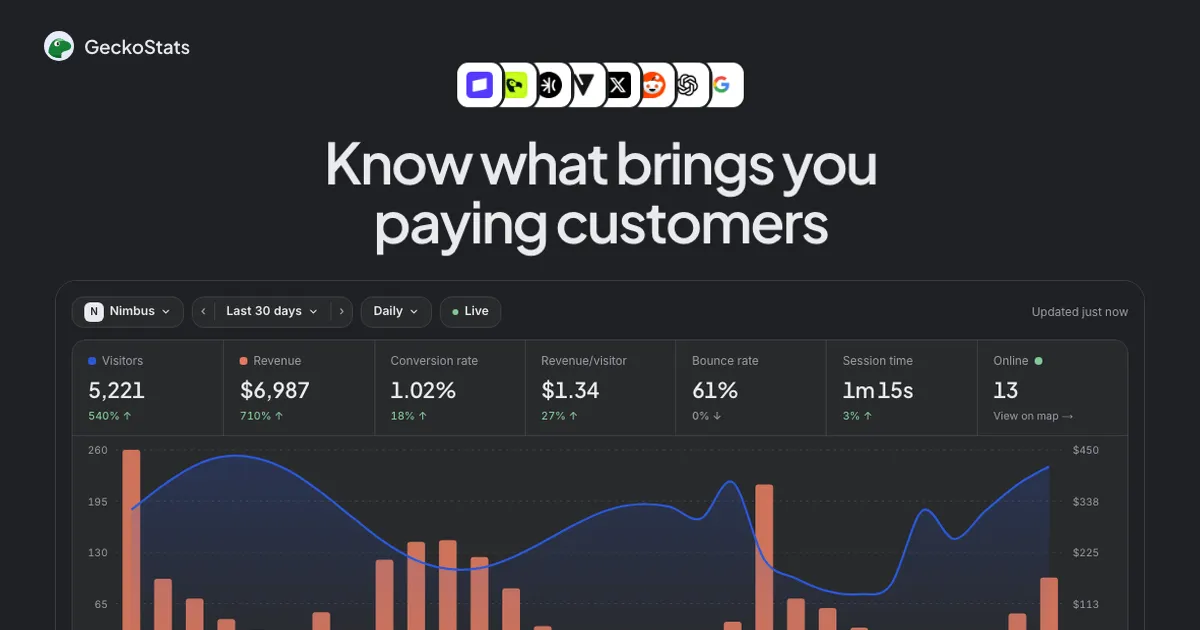
GeckoStats is a privacy-friendly web analytics platform that answers a question most analytics tools ignore: which traffic sources actually bring paying customers? Instead of stopping at pageviews and bounce rates, it connects each visitor's journey to the payments they make, so founders, creators, and developers can see revenue sitting right next to the tweet, search query, or AI chat that produced it. The product is built for people who sell something online and want their analytics to answer a business question rather than a vanity one.
The web analytics market is crowded. Google Analytics dominates by default, while Plausible, Fathom, Simple Analytics, Umami, and DataFast compete on simplicity and privacy. GeckoStats enters that field with a sharper angle: attribution to money. It also leans into the current moment by treating AI crawlers and AI agents as first-class citizens, offering an MCP server so tools like Claude, ChatGPT, Cursor, and Gemini can read your own numbers directly. That combination of revenue attribution and agentic access is what sets it apart. GeckoStats is a solid alternative to Plausible, Fathom, and Google Analytics for anyone who cares more about revenue than raw traffic.
The target audience is clear: indie founders, newsletter writers, small SaaS teams, and developers. These are people who don't have a data team and don't want one. They want to know which post paid off, which newsletter issue converted, and which channel deserves more of their time. GeckoStats is built to answer exactly that.
Key Features
- Revenue attribution across providers. GeckoStats connects to Stripe, Dodo Payments, Polar, and Creem out of the box, each through a single webhook. Every payment is matched back to the visitor who made it, and any other provider can send payments with one API call. The dashboard shows visitors and revenue side by side, so a spike in traffic can be read against the money it produced. This is the core of the product, and it shows.
- Customer journey profiles. Each visitor gets a profile showing first source, number of visits, total spent, and time to first payment. Opening a profile reveals every page and click from first visit to checkout, including timestamps and campaign tags. This makes it possible to see that a customer arrived from a launch tweet, returned directly two weeks later, and finally paid. It's the kind of story most analytics tools never tell.
- Campaign-level tracking. A tagged link per tweet, article, or newsletter issue shows up by name with the visitors and revenue it brought. The campaigns view lists entries like launch-tweet, newsletter-42, and ig-reel with visitor counts and dollar amounts, making it obvious which post paid off. For anyone running multiple channels, this is the fastest way to spot what's working.
- Search Console integration. Connecting Google Search Console once brings in every query, page, and country you rank for, with revenue apportioned beside each. Queries are ranked by what they earn rather than by volume, and estimates are clearly marked with a ≈ symbol so nothing is presented as a fact when it is not. That honesty is refreshing in a category that often overstates its precision.
- AI crawler visibility. The platform reports what GPTBot, ClaudeBot, PerplexityBot, and Gemini read from your site, then puts that against the visitors those same services sent back and the revenue they brought. Because crawlers do not run JavaScript, this requires server-side reporting, which GeckoStats handles. As AI search grows, this view will only become more valuable.
- MCP server for AI agents. GeckoStats exposes 26 read-only tools through an MCP server, so Claude, Claude Code, ChatGPT, Cursor, Grok, and Gemini CLI can query your traffic, revenue, search, funnels, and customers. Keys are issued per website and can be revoked at any time. It's a genuinely forward-looking feature that few competitors offer.
- Live globe and real-time feed. A real-time globe shows everyone on the site right now, alongside a feed of pageviews, goals, and payments as they land. There is even an option to turn sound on and hear every sale. It's a small touch, but it makes the dashboard feel alive.
Supporting extras round out the feature set on every plan: goals and funnels, one-click filters, MRR and churn by source, alerts for tracking failures or revenue drops, release markers via a curl command, retention views, and share-as-image exports.
How It Works
Getting started follows a familiar pattern. A user signs up for the seven-day trial, adds a website, and installs a small tracking script. The script is 6.6 KB gzipped, has no dependencies, and loads after the page, so it should not slow anything down. For sites worried about ad blockers, the script can be served from the user's own domain with a one-line rewrite.
Next comes connecting a payment provider. For Stripe, Polar, Creem, or Dodo Payments, this means adding a webhook. From that point, every payment carries the visitor id back to GeckoStats, and attribution begins. Search Console is connected separately with a single authorization, and the AI crawler view starts populating as bots visit.
Daily use centers on the overview dashboard, which shows visitors, revenue, conversion rate, revenue per visitor, bounce rate, session time, and online count. Clicking any row, source, country, or campaign filters the whole dashboard, which makes drilling into a spike quick. The customer profiles and campaign views answer the "what worked" question directly, and the live globe gives a real-time pulse.
For teams that want to query data conversationally, the MCP server is added with one command or a connector. The learning curve is modest for anyone familiar with analytics tools, and the interface is deliberately plain. The main adjustment is conceptual: users need to think in terms of revenue attribution rather than raw traffic, which is the point.
Use Cases
A solo founder launching a B2B SaaS. She posts on X, writes a newsletter, and runs a few Product Hunt launches. GeckoStats shows that the launch tweet brought 612 visitors and $497, while the newsletter brought 388 visitors and $245. She doubles down on the channel that pays and stops spending time on the one that does not.
A creator running a paid newsletter. Each issue uses a tagged link. When a subscriber buys two weeks after reading, the payment still credits the original issue because attribution goes to the last visit from a real source. The creator can see which topics convert to paid subscriptions rather than just which get opens.
A developer building an AI-integrated product. By adding the MCP server to Claude Code, the developer asks in the terminal which pages earned the most last week and gets an answer drawn from the same numbers as the dashboard. No CSV exports, no context switching.
A marketing team at a small agency. With Growth plan support for up to 30 sites and 30 seats, the team can give each client a dashboard that shows revenue by source. Search Console integration lets them rank queries by money earned, which changes SEO priorities from volume to value.
A content site curious about AI traffic. The AI crawler view shows that ChatGPT read 230 pages and sent back 61 visitors worth $212. The site owner can decide whether to optimize for AI discovery or focus elsewhere, with actual numbers rather than guesses.
Design & User Experience
The interface is deliberately plain, and that's a compliment. The dashboard leads with numbers that matter, and the layout keeps visitors and revenue in the same view rather than burying one behind a tab. Navigation is straightforward: overview, campaigns, customers, search, and the live globe are all a click away, and filtering works consistently across views.
The learning curve is modest for anyone who has used an analytics tool before. The bigger adjustment is conceptual, since users need to think in terms of revenue attribution rather than raw traffic. The live globe and sound-on-sales option add personality without getting in the way. If there's a rough edge, it's that the product is new and the interface, while clean, doesn't yet have the depth of customization that enterprise teams expect. Mobile responsiveness is functional but clearly secondary to the desktop experience.
Pricing & Value
GeckoStats offers two plans, Starter and Growth, both with a seven-day free trial and no commitment. Pricing scales by monthly events, from 25K up to 10M on a slider. At 100K events, Starter costs $17 per month and covers one site and one user. Growth costs $35 per month at the same event level and adds up to 30 sites and 30 team seats. Yearly billing offers a 17% discount, and prices exclude VAT.
Every plan includes all providers, Search Console, the AI assistant, and the MCP server, which is a generous decision. The hero copy mentions "from $9 a month," which likely reflects the smallest event tier. Compared with Plausible and Fathom, which charge similar amounts for simpler analytics, GeckoStats adds revenue attribution and agent access for roughly the same money. For anyone already paying for a payment provider and a separate analytics tool, the consolidation is a real value. You can explore the pricing plans to see where your event volume lands.
Who Is GeckoStats Best For?
GeckoStats fits three groups especially well. Indie founders and solo SaaS operators who sell online and want to know which channel actually pays will get the most from it. Newsletter writers and creators running paid subscriptions will appreciate the campaign-level attribution that credits the issue, not just the last click. And small marketing teams or agencies managing multiple client sites will find the Growth plan's 30 sites and 30 seats genuinely useful.
Two groups might want to look elsewhere. Large enterprises with sophisticated data teams will find the feature set too narrow compared with Google Analytics or a dedicated warehouse setup. And businesses without a supported payment provider will need to do extra work to wire up attribution, which may not be worth it for very small operations.