Overview
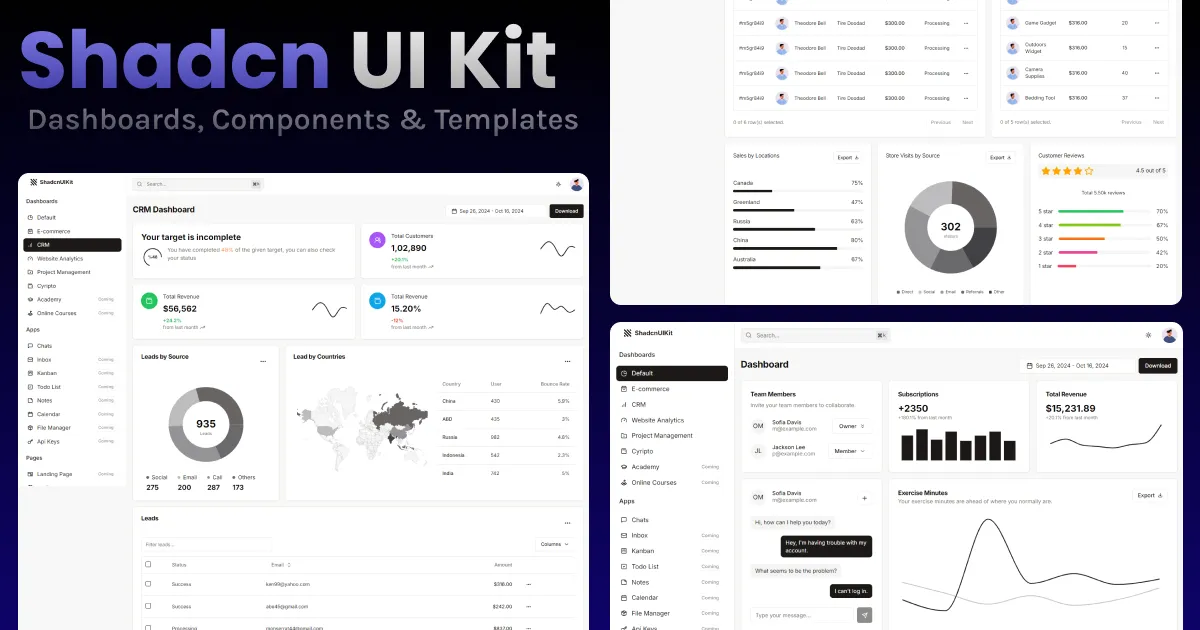
Shadcn UI Kit is a comprehensive collection of pre-built assets for modern web development, specifically designed for developers who use shadcn/ui, Tailwind CSS, and React. It addresses the common pain point of building UI from scratch by offering a vast library of admin dashboards, website templates, components, and UI blocks. The kit is positioned as a time-saving solution that helps developers launch projects faster, reduce development costs, and maintain high-quality design standards. In a market crowded with UI kits and template libraries, Shadcn UI Kit stands out by being deeply integrated with the shadcn/ui ecosystem, which is already popular among React developers. It offers both free and premium tiers, making it accessible to individual developers and large teams alike. The website showcases a wide range of products, including 12 admin dashboards, 14 web app templates, 4 website templates, 522 components, 304 blocks, and 70 examples, all built with the latest technologies like Next.js 16, React 19, and Tailwind CSS v4. Shadcn UI Kit is a solid alternative to Tailwind UI, Tremor, and Mantine UI. This review will explore its key features, usability, pricing, and overall value.
Key Features
- Admin Dashboards: The kit includes 12 production-ready admin dashboards, each tailored for different industries such as CRM, e-commerce, finance, healthcare, and project management. These dashboards come with essential features like tables, charts, forms, and navigation menus, all fully customizable. For example, the CRM dashboard provides a comprehensive view of customer interactions, while the finance dashboard offers detailed financial metrics. This variety allows developers to pick a starting point that closely matches their project's needs, saving significant development time.
- UI Blocks and Components: With over 304 blocks and 522 components, the kit covers a wide range of UI patterns, from hero sections and pricing tables to complex data tables and modal dialogs. These are designed to be easily copied and pasted or installed via the shadcn CLI, making integration seamless. The blocks are categorized by use case, such as marketing, e-commerce, and dashboard UI, which helps developers quickly find what they need. Each block is built with clean, maintainable code, ensuring consistency and ease of customization.
- Website Templates: The kit offers several premium website templates, including Neofolio (a portfolio template), Soho (a chat app template), and Cosmic (a SaaS landing page template). These templates are built with Next.js and Astro, and are fully responsive and production-ready. They come with both light and dark mode variants, and are designed to be easily customized to match a brand's identity. For instance, the Cosmic template is optimized for high conversion, making it ideal for SaaS startups looking to launch a landing page quickly.
- Theme Generator: A standout feature is the visual theme generator, which allows users to customize colors, typography, radius, and spacing for their shadcn/ui projects. The tool provides an infinite canvas for experimentation, supports light and dark modes, and allows users to export the generated CSS variables directly into their codebase. This is particularly useful for developers who want to create a unique brand identity without manually tweaking CSS variables.
- Animated Components and Illustrations: The kit includes a growing collection of animated bento cards, motion effects, and interactive UI illustrations. These are built with shadcn/ui, Motion, and Tailwind CSS, and can be easily integrated into projects. Examples include animated credit score cards, integration flow diagrams, and particle effects. These components add a modern, dynamic feel to applications, which can enhance user engagement.
- Compatibility and Integration: All templates and components are fully compatible with React and can be used with popular frameworks like Vite, Next.js, Remix, and TanStack Start. The kit also supports TypeScript, ensuring type safety. Additionally, it offers a CLI for easy installation and a Figma file (coming soon) for designers, bridging the gap between design and development.
- Continuous Updates: The kit is regularly updated with new components and features, as evidenced by the changelog showing recent additions like 25 new modal dialog blocks. This ensures that users have access to the latest UI patterns and best practices, keeping their projects up to date.
How It Works
Getting started with Shadcn UI Kit is straightforward. Users can browse the website to explore the available dashboards, blocks, components, and templates. For free resources, they can simply copy and paste the code or use the shadcn CLI to install components directly into their project. For premium content, users need to purchase a license, which grants access to the full library. The onboarding process is minimal: after signing up, users can immediately start downloading or installing assets. The theme generator is a web-based tool that requires no setup; users can customize their theme visually and then copy the generated CSS variables. The learning curve is low for developers familiar with shadcn/ui and Tailwind CSS, as the components follow the same conventions. The kit's documentation and changelog provide guidance on usage and updates. Overall, the workflow is designed to be efficient, allowing developers to integrate assets quickly and focus on building their application's unique features.
Use Cases
- Solo Founder Launching a B2B SaaS: A solo developer building a SaaS product can use the Cosmic landing page template to create a high-converting marketing site, and then use the admin dashboard templates to build the application's backend interface. The pre-built components and blocks save weeks of development time, allowing the founder to launch faster and iterate based on user feedback.
- Agency Building Client Websites: A web development agency can leverage the website templates and UI blocks to quickly deliver professional-looking websites for clients. The templates are customizable, so the agency can adapt them to different brands. The theme generator allows for quick color and typography changes, making it easy to create unique designs for each client without starting from scratch.
- Startup Building an Internal Tool: A startup that needs an internal dashboard for tracking metrics can use the admin dashboard templates as a starting point. The dashboards come with charts, tables, and forms, which can be customized to display the specific data the team needs. This reduces the time spent on building UI components, allowing the team to focus on data integration and business logic.
- Developer Learning shadcn/ui: A developer who wants to learn shadcn/ui and Tailwind CSS can use the free components and blocks as learning resources. By examining the code and experimenting with customization, they can quickly grasp best practices and patterns. The examples provide real-world use cases, which are valuable for understanding how to structure complex UIs.
- E-commerce Business: An e-commerce company can use the e-commerce blocks, such as checkout pages, product lists, and product details, to build or improve their online store. These blocks are designed to optimize the shopping experience, with features like product quickviews and customer reviews. The admin dashboard for e-commerce can help manage orders, inventory, and customer data.
Design & User Experience
The Shadcn UI Kit website itself is a testament to the quality of the product. The design is modern, clean, and professional, with a strong emphasis on typography and spacing. Navigation is intuitive, with clear categories for dashboards, blocks, components, and templates. The site is fully responsive, and the dark mode toggle is a nice touch that showcases the kit's theming capabilities. The learning curve is minimal for anyone familiar with shadcn/ui and Tailwind CSS, as the components follow the same conventions and patterns. One standout design decision is the use of live previews and interactive demos, which allow users to see exactly what they are getting before downloading. The main area for improvement is the lack of a visual editor or Figma file, which are still in development. However, the theme generator partially fills this gap by providing a visual way to customize colors and typography. Overall, the user experience is smooth and well thought out, making it easy for developers to find and integrate the assets they need.
Pricing & Value
Shadcn UI Kit offers a freemium model with a free Starter plan that includes one free template, nine free blocks, and fourteen free examples. This allows users to test the quality of the assets before committing to a purchase. The premium plans are one-time payments: Pro costs $79 (regularly $129), Team costs $199 (regularly $399), and Enterprise costs $499 (regularly $699). The Pro plan is designed for solo makers and includes 3 premium templates, 295 premium blocks, and 56 premium examples, with support for 1 user. The Team plan is for growing startups and supports up to 10 users, while the Enterprise plan offers unlimited users and is aimed at agencies and large enterprises. All premium plans include lifetime access and free updates. Compared to other UI kits and template libraries, the pricing is competitive, especially considering the breadth of content and the one-time payment model. The free tier is generous enough for small projects, and the premium plans offer substantial value for professionals who need a wide range of assets.
Who Is Shadcn UI Kit Best For?
Shadcn UI Kit is best for three main groups. First, solo developers and indie hackers who want to ship products quickly without hiring a designer. The pre-built components and templates let them focus on functionality and business logic. Second, small to mid-sized agencies that need to deliver multiple client projects efficiently. The variety of templates and the theme generator make it easy to create unique designs for different brands. Third, startups that need to build internal tools or admin panels fast. The dashboards come with charts, tables, and forms that can be customized to display specific data. On the other hand, developers who prefer to build everything from scratch or who need highly specialized, custom UI components might find the kit too restrictive. Similarly, teams that rely heavily on design tools like Figma may want to wait until the Figma file is released. For those users, a more flexible option like Tailwind UI or a component library with a visual editor might be a better fit.